Providers & models
Everything configurable in MyRA lives in Settings — you should never need to open a JSON file.
Providers: where the chat model lives
Settings → Providers is where you point MyRA’s conversation at an endpoint. Add as many as you like:
- A local endpoint — anything that speaks the OpenAI API: llama.cpp, Ollama, vLLM, or MyRA’s own bundled runtime.
- A hosted provider — a base URL and an API key. Keys go to your OS keyring, never to disk in the clear.
A provider’s local/external label can only make MyRA more cautious: an endpoint that isn’t actually on this machine is treated as external no matter what it’s labelled.
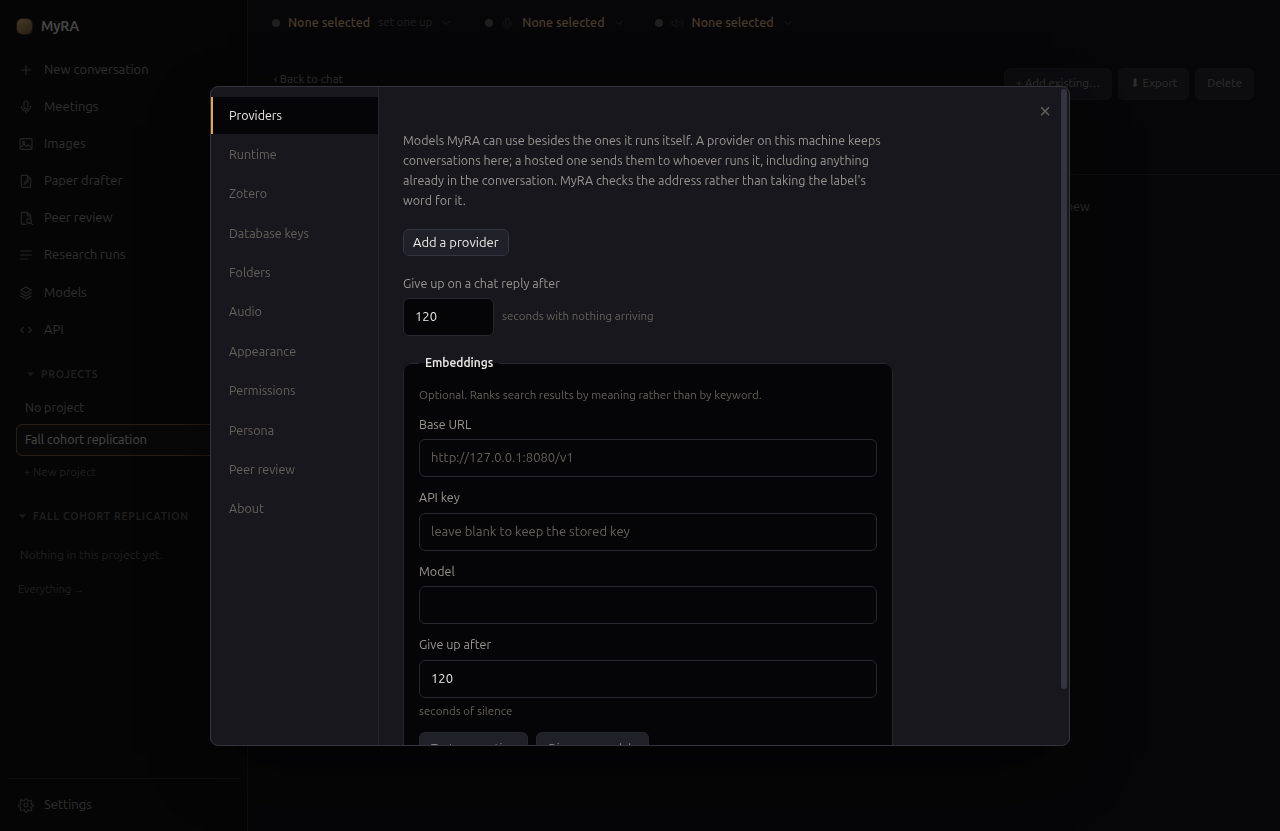
This pane also configures embeddings — optional, and used only to rank search results by meaning instead of keyword — and how long MyRA waits for a reply before giving up.
The bundled runtime
MyRA can run models itself, via a local runtime called Lemonade, managed under Settings → Runtime. It downloads engines per model family (llama.cpp for chat, whisper.cpp for transcription, kokoro for voice, stable-diffusion.cpp for images) and MyRA supervises them directly — nothing it starts outlives the app, and it never advertises itself on the network.
The Models page
Models in the left rail shows what your machine can run, and what’s on it already:
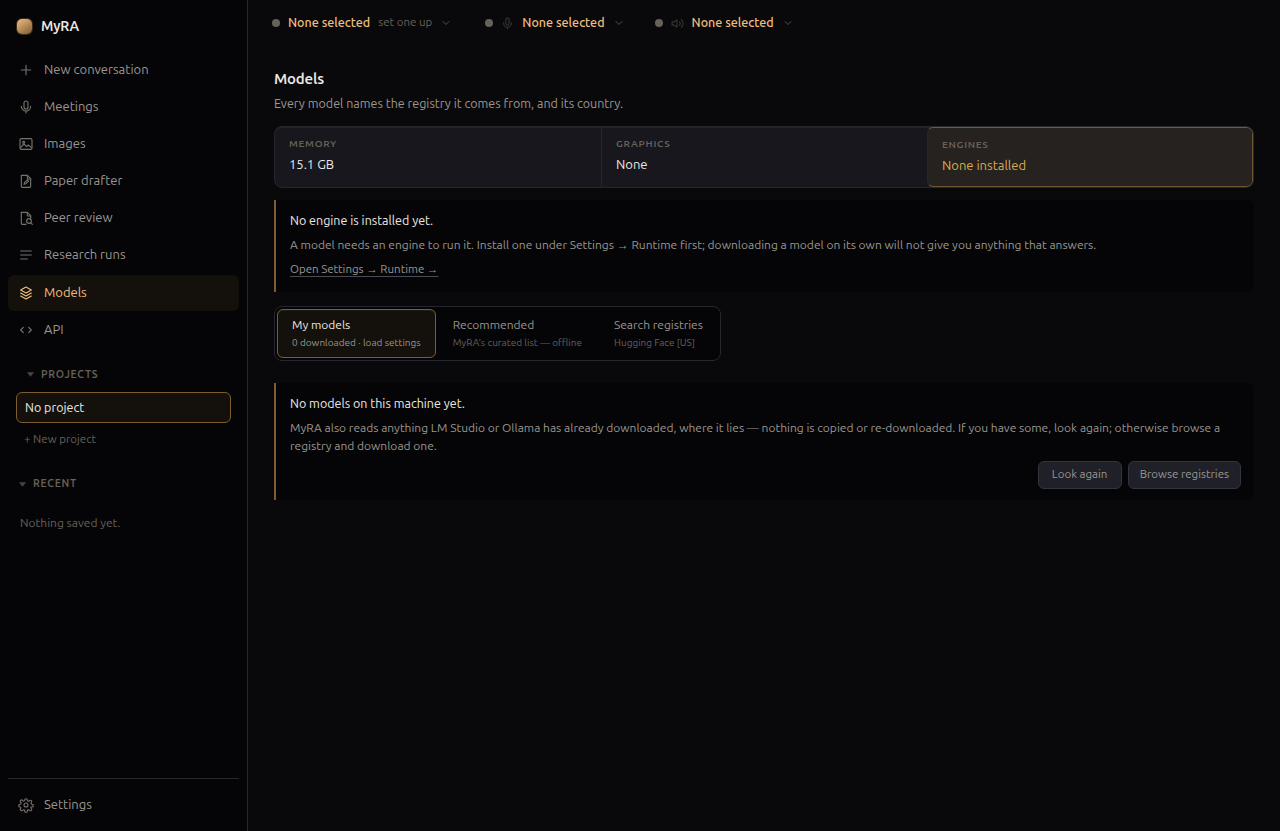
- My models — what’s downloaded, with load settings per model.
- Recommended — MyRA’s own curated list, available offline.
- Search registries — currently Hugging Face. Typing in the search box sends nothing; pressing Search sends what you typed, and every result is labelled with the registry and country it came from.
MyRA also reads models you’ve already downloaded with LM Studio or Ollama — nothing is copied or re-downloaded.
Downloads are anonymous by default. Some publishers gate a repository behind an accepted licence; for one of those, paste a Hugging Face access token into Settings → Runtime — MyRA restarts the model server once to carry it, only for that download, unless you choose to send it with every download instead.
Sizing a model to your hardware
Loading a model with no guidance defaults to a 4,096-token context window, whatever the model can actually do. MyRA replaces that default by computing a context size that:
- Leaves a real buffer against graphics and system memory together, not just VRAM — the KV cache alone can be several gigabytes beyond the file size, and a context that “fits on paper” still shares the machine with everything else running on it.
- Never exceeds the model’s own trained length or the ceiling the runtime reports for it.
- Is never silently written down when it doesn’t fit — a context that won’t fit is left unset rather than loaded and left to fail.
A model you loaded and pinned settings for yourself is never overridden.
Sampling defaults from the model’s own authors
When you download a model, MyRA also fetches its config.json and generation_config.json from Hugging Face — two small text files, not the weights — so sampling defaults (temperature, top-p, and the rest) start from what the model’s authors published, with anything you set yourself applied on top, per field. Loading a model afterwards asks the network nothing.
The local API
API in the left rail lets another app on your machine use the model MyRA is running — Obsidian, a notebook, a script — through an OpenAI, Anthropic, or Ollama-shaped endpoint.
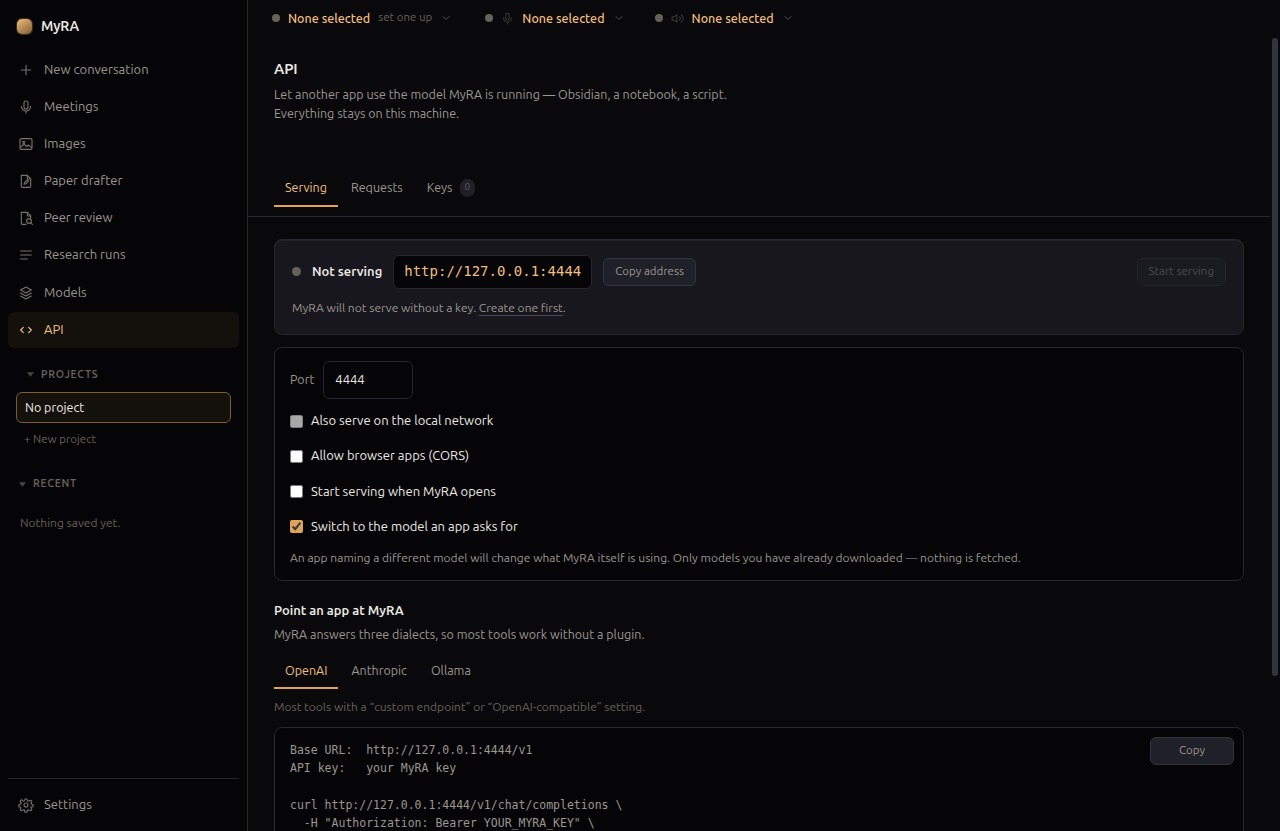
It’s off by default, refuses to start without a key, and only listens on loopback unless you explicitly turn on Also serve on the local network.
Seeing what you’ve used
Settings → Usage shows how much MyRA has asked of its models over any date range: input and output tokens, requests, generation speed and, for a hosted model, an estimated cost. You can break it down by model, project, feature (chat, deep research, peer review, the paper drafter, meetings…), where it ran (this computer or a hosted provider), who asked (MyRA itself or an app using the local API, key by key), and a deep-research run’s stages. Click a row to narrow everything to it; Export CSV writes one row per call for a spreadsheet. Calls from another app that arrive in a rapid burst are merged into one row a second, with a column saying how many.
A few things the page is careful about:
- Costs are the provider’s own prices. Where a provider publishes a price for a model (OpenRouter does), MyRA keeps the price it reported at the time of each call. MyRA keeps no price list of its own, so a hosted model with no published price is left out of the estimate, and the page says how many calls that was.
- “Not reported” is not zero. Some servers do not send token counts, for example an API client that streams without asking for them. Those calls are counted as requests and named on the page instead of being added in as zero.
- A project’s usage follows its work. A conversation filed into a project afterwards brings its usage with it.
- Counts only, kept here. Nothing of what was said is recorded, and nothing is sent anywhere. Record usage at the bottom of the page turns recording off, and Clear usage log… deletes every record so you can start fresh.
Counting starts from the version that added this page. Older conversations are not counted back.