Meetings
MyRA records, transcribes, and writes up meetings — entirely on this machine.
Recording
MyRA records two tracks: your microphone, and the system’s own audio output. That’s what separates the speakers without a diarization model — a microphone alone only captures the person wearing the headphones, so a remote meeting would transcribe to one side of the conversation. You’ll be asked which window or screen to share for the second track; the video is discarded immediately and only the audio is kept.
Nothing is sent anywhere while you record.
Transcribing and writing notes
Recording, transcribing, and note-taking are separate, resumable stages — each leaves its own file in the meeting’s folder, so a meeting whose transcription failed partway through doesn’t just vanish from the app while the audio sits there on disk. You can redo the notes with a different prompt without re-transcribing, since transcription is the expensive step and note-taking is cheap.
The report
Every meeting report is checked against its own transcript, claim by claim. Anything the model cannot source back to something actually said is filed under its own ## Unverified heading, instead of being stated as fact.
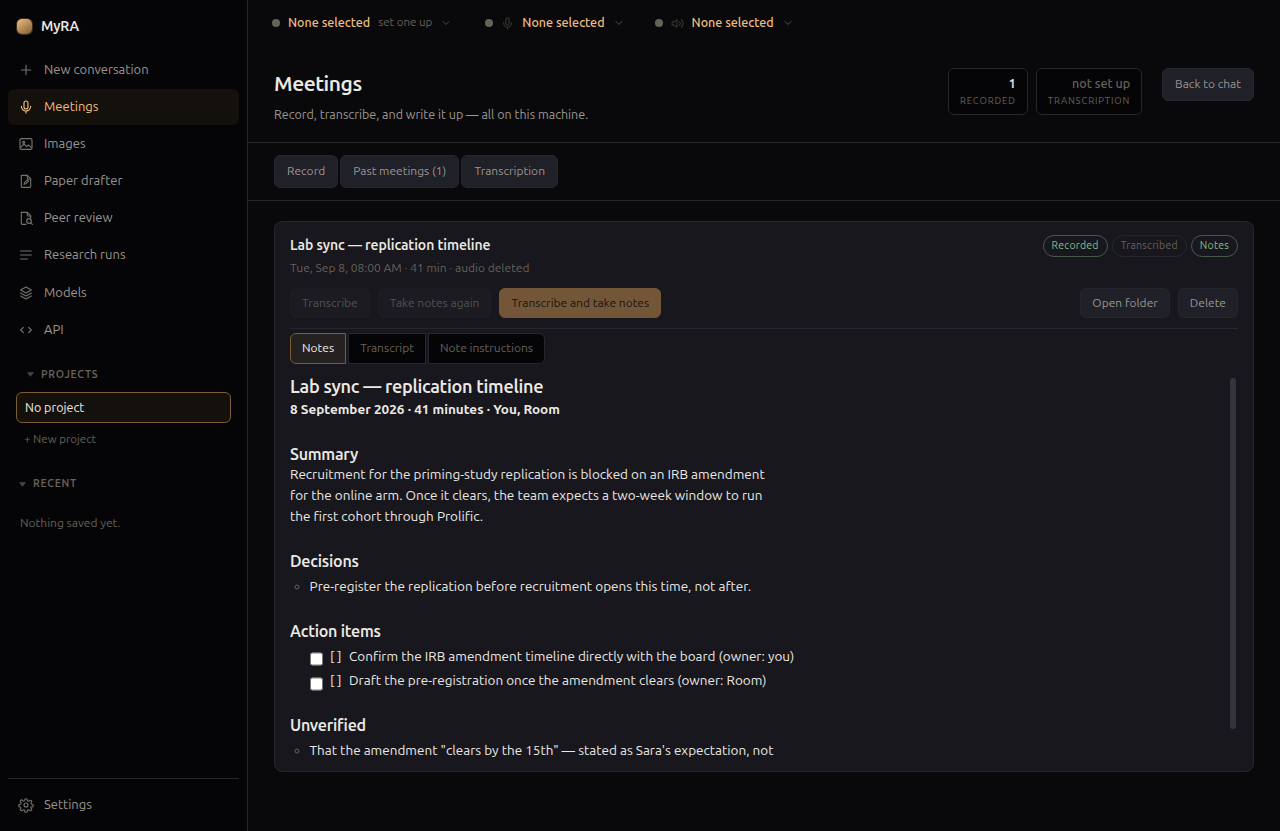
You can give per-meeting instructions for the notes — “this is a supervision meeting, keep the methodological objections in full” — from the meeting’s own Note instructions tab, which overrides the default prompt in Settings just for that one meeting.
Feeding a meeting into a project’s notes
A meeting filed to a research project offers Add to project notes…, which pulls out the decisions, questions, and risks the transcript actually supports and shows them for you to review before anything is saved — the same claim-checking the report itself applies, not the model’s summary of what it thinks happened.